

Web panel for automation orchestration
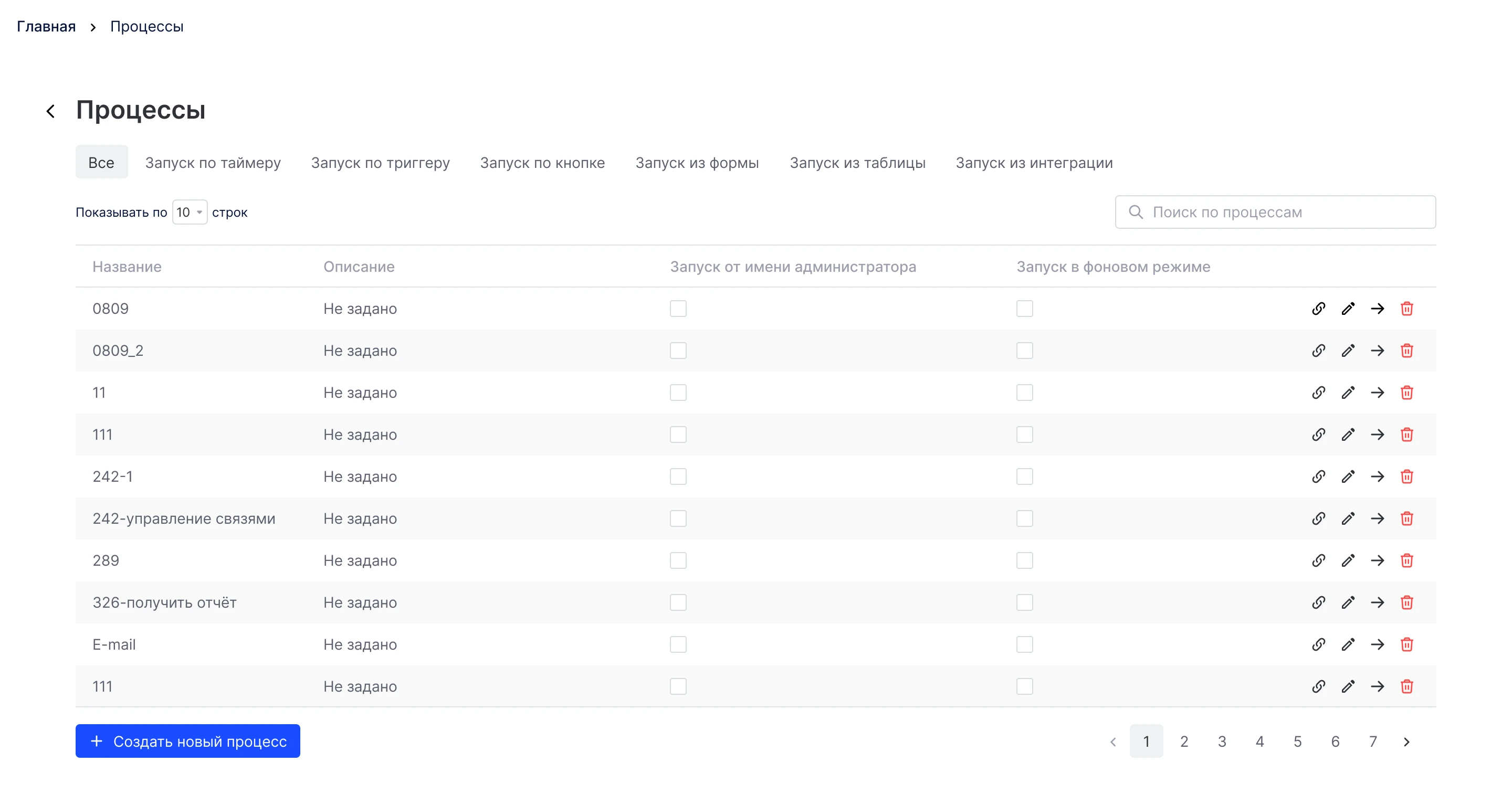
Primo RPA orchestrator web console: projects, launch and control of RPA bots. Redesign of key screens for production without halting releases.
Interface for training and using AI models in business processes: data work, automation scenarios, and Smart OCR.
Work on the Lunacy interface at Icons8: user flows, complex prototypes, improved functionality and interface logic.
Redesign and evolution of the game engine interface: a new working concept, refreshed visual system, and hundreds of complex user scenarios worked through.
Design of a mobile app for booking doctors and managing medical services. Focus on a simple user path, clear navigation, and quick access to the right actions.
Primo RPA orchestrator web console: projects, launch and control of RPA bots. Redesign of key screens for production without halting releases.
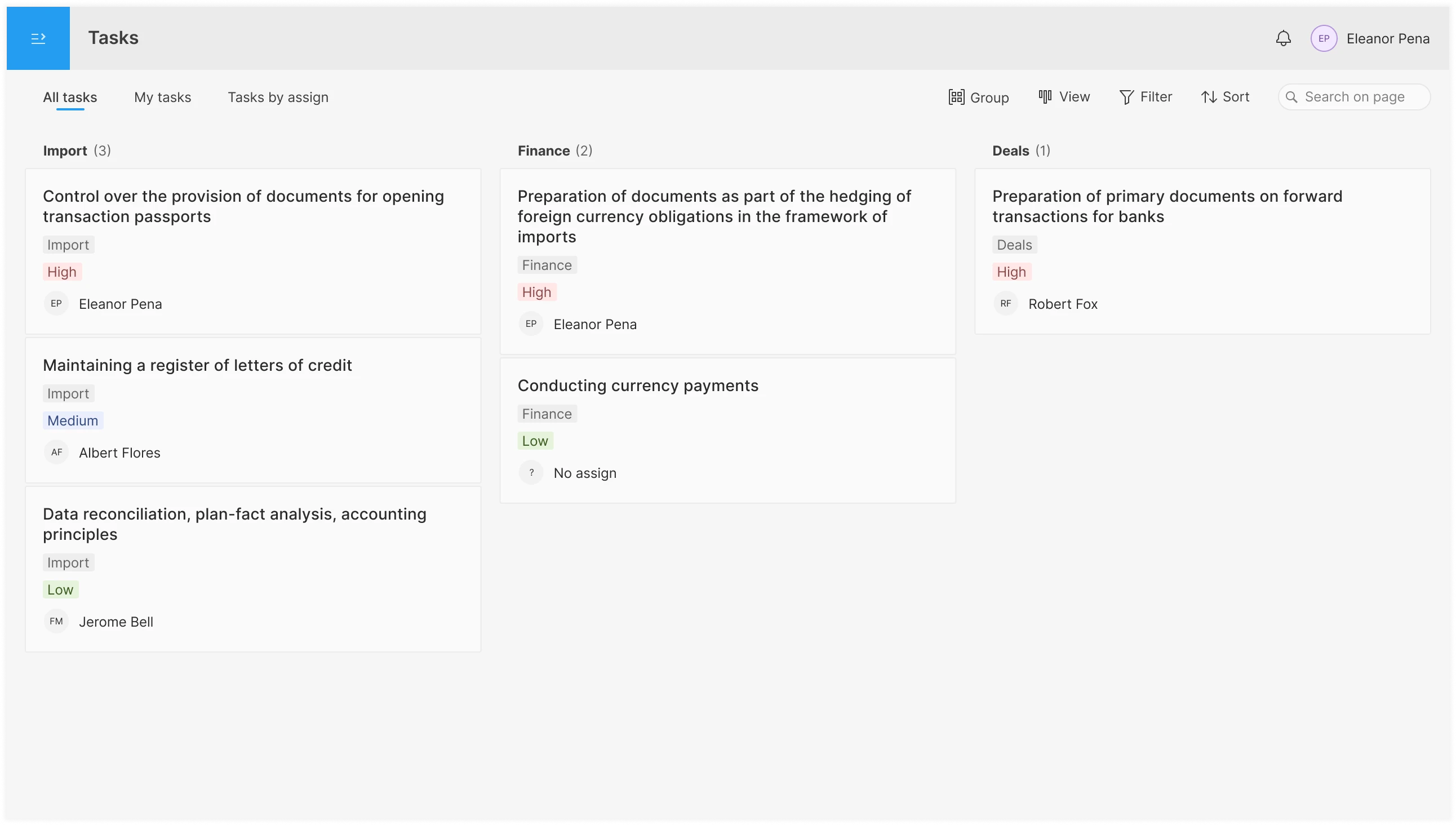
A product concept for a service to set, distribute and track tasks, with emphasis on process transparency and comfortable teamwork.
Interface for planning and distributing tasks in the operations department: shared pool, personal ToDo, per-assignee overview; tabs, filters, board / list / table views, drag & drop.
Development and support of digital systems and tools that boost team efficiency.
A business process automation platform with a suite of products: a studio for building bots, an orchestrator to manage them, an Idea Hub for process selection, and AI servers for models and data recognition.
A vector editor for UI/UX and web design with Sketch support, a built-in library of icons/photos/illustrations, and a set of AI tools to speed up routine work.
No-code/low-code platform for building 2D and 3D games without writing code.
An international technology company specializing in custom development and engineering solutions for large enterprise clients.
A secure messenger with end-to-end encryption and no message storage on servers, focused on maximum user privacy.
A studio building mobile and web apps end-to-end for businesses and entrepreneurs.
My experience covers both launching a product's first versions from scratch and evolving mature solutions — where the goal is not to break familiar flows but to refine them carefully.
Below are examples of real business tasks and how I approached them
Make a complex product clearer so users reach key actions.
I map the user journey and cut steps that don't move them toward the goal.
I design flows so every step makes clear what's happening and what to do next.
I make even complex features feel natural by using familiar patterns and standard UI elements.
Improve the first steps in the product and guide users to their first "aha" moment.
I remove everything that distracts from the first result: extra steps, optional fields, secondary details.
I replace long explanations with small hints exactly when they're needed — no lengthy tours or complex manuals.
Reduce support load through interface design.
I collect frequent requests and, based on them, simplify the flow and UI so users can solve issues on their own.
Tie the interface to product goals, not just a feature list.
I start from the business and user problem we're solving, then build flows and UI around it.
I turn scenario problems into clear hypotheses and help the PM pick what actually moves the needle.
Bring several products or modules to a unified look and logic.
I assemble a shared UI kit and core principles usable across all products.
I surface repeated patterns and consolidate them into one system instead of a dozen similar solutions.
I unify scattered solutions into a single design system that's comfortable for both designers and developers.
Make the interface scalable without piling up hacks.
I define simple design principles and component usage rules.
I set up the design system structure so it's genuinely maintainable and extensible with new patterns.
Tidy up interfaces that grew piece by piece over time.
I merge similar solutions into common components and patterns, removing duplicates and accidental differences.
I keep the interface clean and modern: readable typography, clear hierarchy, accents without visual noise.
Refresh the product's look so it doesn't feel dated next to competitors.
I start with frequently used screens and elements so the impact shows for both users and business.
I align update stages with the current roadmap and dev workflow so familiar flows and releases aren't broken.
I set the base style — typography, color, spacing — so the interface looks clean and modern.
Get a real picture of user behavior instead of relying on the team's guesses.
I talk to users: I watch how they solve their tasks in the product and what they do at each step.
I turn research findings into concrete changes in the interface and flows.
Make sure key flows work before shipping them to production.
I prepare simple usability-test scenarios based on real user tasks.
Understand how interface changes affect the product's key metrics.
I help describe the key events and funnels that reflect real user steps.
I look at metrics alongside real usage scenarios and suggest interface changes that make things easier for users and better for the product.
Build clear processes inside the design team.
I introduce regular design reviews of shipped work, where everyone gets useful, constructive feedback.
I agree on a task brief template and transparent acceptance criteria, so it's clear when a task is truly done.
I set up a workflow that handles both planned work and urgent "on-fire" tasks.
Make design, product, and engineering work as one team, not three separate camps.
I act as the bridge: discuss flows with the PM, constraints with engineering, and capture decisions in the interface.
Hire and grow product designers for a complex product.
I help shape the candidate requirements.
I take part in hiring: I check how a candidate handles flows, constraints, and complex cases.
I structure interviews to assess thinking and tooling.
I set up onboarding through real tasks and regular reviews so the designer gets up to speed and adds value faster.
I run regular 1:1s with designers: we review decisions, growth areas, and next steps.
I enjoy building small side projects and sharing something useful with the world.
I publish useful files and plugins for the community.
Nice visuals with UI elements.
My channel about design. Posts on product design and useful links.
My projects and code experiments.
A Figma plugin with AI features.
A plugin for column-based card view in Obsidian.
Building this site with an AI IDE.